Pricing
$79.00
Published
- 2026-11-17
- 2026-11-17
- Framer
- Well Documented
- Fully Responsive
Additional Information
Published
2026-11-17
Last updated
2026-11-17
Technologies
Framer
Categories
We do not store any credit card information on our servers, payments are processed by world-leading payment gateways. We are fully secured with our SSL.

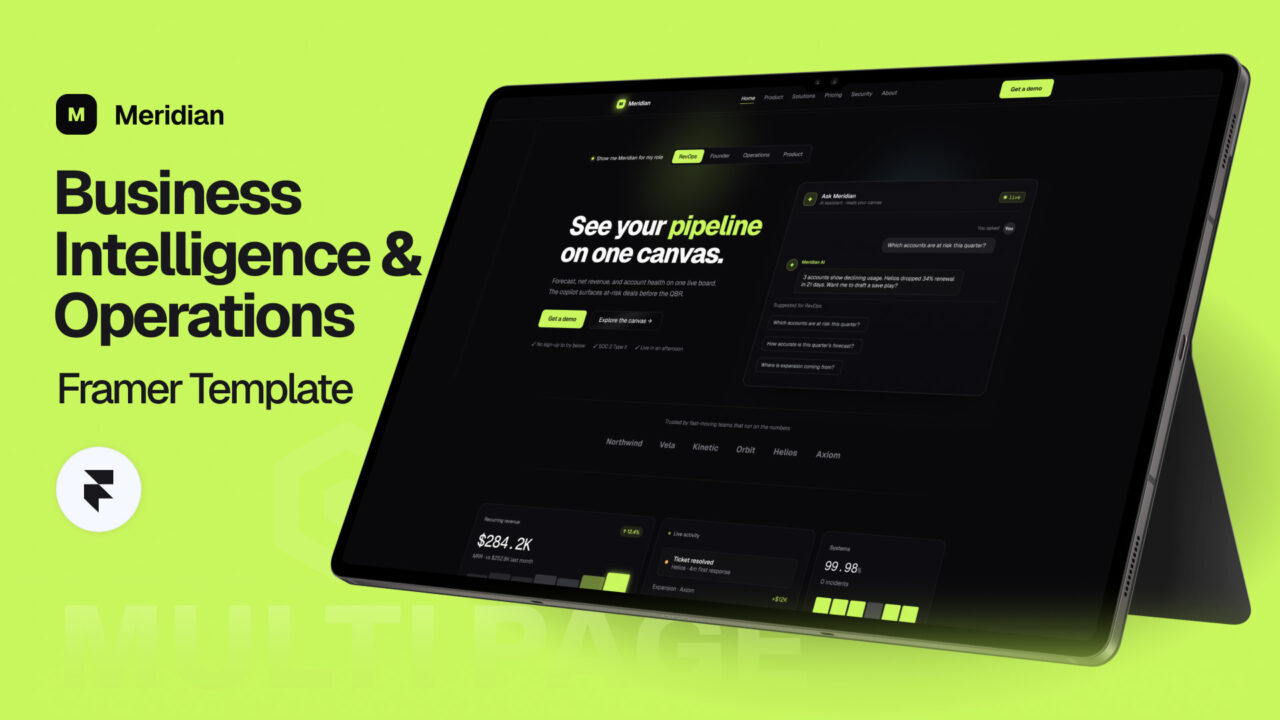
Meridian – AI SaaS & Business Intelligence Framer Template
Meridian gives you a complete, multi-page Framer site built to showcase live dashboards, metrics, and operational insights, so you can launch a credible BI product without starting from scratch.
Who This Is For
- The Operations Leader: A COO or head of operations at a growing company who needs a polished site to present operational visibility to stakeholders and investors, without a months-long web project.
- The BI Product Founder: A founder or analyst building a data or analytics product who wants a professional marketing site that explains the value of dashboards, connectors, and automated alerts clearly.
- The Freelance Web Designer or Agency: A designer or agency delivering BI and SaaS client work who needs a fast, reusable, fully customizable Framer foundation to ship client sites in days instead of weeks.
What’s Included
Pages
- Home Page — A high-converting landing page that introduces the product, social proof, and core value in one scroll.
- About Page — A company story and mission layout for establishing credibility and brand trust.
- Product Page — A deep dive into the dashboard experience, showcasing tiles, charts, and shareable views.
- Solutions Page — Use-case layouts for finance, operations, sales, and product teams.
- Pricing Page — A clear plan comparison structure that reduces purchase hesitation.
- Security Page — A trust-focused layout covering access controls, role-scoped views, and data handling.
- Contact Page — A streamlined contact form and inquiry section for sales and support.
- Refund Policy Page — A clean, readable template for transparent refund terms.
- 404 Page — A branded error page that keeps visitors engaged instead of bouncing.
Sections
- Hero — A bold opening statement with a headline, subheadline, and primary call to action.
- Trusted By — A logo strip that builds immediate credibility with recognizable brands.
- Metrics — A stat block that quantifies outcomes like time saved and integrations available.
- Features — A grid that presents the core capabilities of the platform in scannable cards.
- Live Product — An embedded, interactive preview of a live dashboard experience.
- AI Copilot — A dedicated showcase for plain-language querying across the full board.
- Integrations — A visual map of warehouses, CRMs, finance tools, and product analytics connectors.
- Testimonials — Customer quotes and case-style proof points that drive conversions.
- Pricing — A tiered pricing block that makes plan differences obvious.
- FAQ — An accordion that answers common objections before they become barriers.
- Final CTA — A closing conversion banner that restates the value and prompts action.
- Footer — Navigation, legal links, and contact details organized for easy access.
Key Features
Composable Tiles
Build dashboards by dragging and dropping metric tiles, data tables, and charts into place. Each tile is a reusable component, so you can rearrange layouts for different audiences without rebuilding them. This makes it easy to demonstrate multiple product views on one site.
Reasoning AI Copilot
Showcase an assistant that answers plain-language questions across the entire board. The copilot section is designed to walk visitors through real questions, such as “Why did revenue dip last week?” This turns a abstract AI promise into a concrete, demonstrable feature.
Native Connector Library
Present 40+ native connectors spanning data warehouses, CRMs, finance systems, and product analytics tools. The integrations section is structured to make connectivity scannable and credible. Buyers can immediately see whether their existing stack is supported.
Signal Automations
Highlight automated alerts that notify channels when metrics cross defined thresholds. The layout explains how signals reduce manual monitoring and surface issues before they escalate. It is a strong differentiator for operations-focused buyers.
Always-Live Shareable Views
Demonstrate dashboards that stay current and can be shared through role-scoped or public links. The template includes layouts for explaining access control and permissions. This addresses a common buyer concern about who sees what.
Differentiators
- Built for the Niche, Not Adapted to It: Generic templates force you to reshape a portfolio or landing page into a BI product story. Meridian ships with sections for metrics, connectors, copilots, and live product previews already in place.
- Launch-Ready Structure: Most templates provide visual shells that still require weeks of content architecture. Meridian includes a complete multi-page structure, from Security to Refund Policy, so you can focus on your messaging and data.
- Trust-First Conversion Flow: Generic templates rarely address the questions BI buyers ask, such as data security and integration coverage. Meridian includes dedicated Security, Integrations, and FAQ sections that address these objections directly.
Comparison Table
| Factor | Meridian | Generic Framer Template | Hire a Developer |
|---|---|---|---|
| Cost | $99 one-time | Low to moderate | Typically thousands of dollars |
| Time to Launch | Around 24 hours | Several days to weeks of customization | Several weeks |
| BI-Specific Sections | Included (Metrics, Live Product, AI Copilot, Integrations) | Must be built manually | Must be scoped and built |
| Multi-Page Structure | Nine pages included | Varies, often limited | Custom, time-intensive |
| Trust and Compliance Pages | Security and Refund Policy included | Often missing | Requires separate scoping |
| Editing Without Code | Yes, built on Framer | Yes | Usually requires ongoing developer access |
| Ongoing Maintenance | Self-managed in Framer | Self-managed | Retainer or hourly fees |
Technical Specs
- Platform: Framer
- Template Structure: Multi-page (9 pages)
- Core Sections: 12 modular sections, editable independently
- Layout: Responsive design built with Framer’s breakpoint system for desktop, tablet, and mobile
- Components: Reusable Framer components for tiles, metric cards, testimonials, pricing tiers, and FAQ accordions
- Content Management: Structured for Framer CMS collections, so blog posts, testimonials, or integrations can be updated without editing layouts
- Interactions: Scroll-triggered animations and hover states, configurable in Framer’s interaction panel
- SEO: Editable page titles, meta descriptions, and heading hierarchy on every page
- Customization: Fully editable colors, typography, and spacing through Framer’s style system
- Hosting: Published on Framer’s hosting, with custom domain support
FAQ
1. Do I need to know code to use Meridian in Framer? No. Meridian is built entirely in Framer, so you can edit text, swap images, rearrange sections, and adjust styles visually. Basic familiarity with Framer’s canvas is helpful, but custom code is not required.
2. Can I connect my real BI data to the dashboard sections? The template is designed as a marketing and presentation site. You can use Framer’s CMS and embeds to display live or sample dashboard views, but connecting to your warehouse or CRM happens within your BI platform, not inside the template itself.
3. Which data tools does the integrations section cover? The integrations section is structured to showcase 40+ native connectors across data warehouses, CRMs, finance systems, and product analytics tools. You can edit the logos and names to match the specific integrations your product supports.
4. Is the template suitable for a BI product that serves non-technical operations teams? Yes. The copy structure, Solutions page, and AI Copilot section are built around plain-language questions and outcomes, which resonates with operations leaders who are not data specialists. You can adjust the messaging to match your audience’s technical level.
5. Can I use Meridian for client projects as a freelance designer or agency? Yes. Meridian is designed to be a reusable foundation for client work. You can customize the branding, content, and layouts for each client, and the modular sections make it efficient to deliver multiple BI and SaaS sites.
Meridian Features:
- Easy-to-Use Framer Interface
- Business Intelligence Template
- Modern Dashboard & Analytics Design
- AI Copilot Showcase
- 40+ Integration Connectors
- Automated Signal Alerts
- Fully Responsive Layout
- SEO Optimized Structure
- Reusable Framer Components
- 100% Customizable Design
For the best experience, open the demo in a new tab.
Frequently Asked Questions
Framer is a web-based design and development platform that allows users to create interactive and responsive websites without requiring advanced coding skills.
Yes, Framer is beginner-friendly and offers intuitive drag-and-drop tools, pre-made templates, and comprehensive tutorials to help new users.
Framer provides responsive design tools, animation capabilities, no-code customization, CMS integration, and seamless team collaboration.
Yes, Framer allows you to design and publish fully functional and responsive websites directly from the platform.
Framer has built-in SEO tools, allowing users to optimize meta tags, titles, and descriptions to improve search engine visibility.
Yes, Framer supports integrations with various tools, such as Google Analytics, Mailchimp, Zapier, and others, to enhance functionality.
Framer focuses on interactivity and animation, offering designers and developers more creative freedom than traditional no-code platforms.