Pricing
$69.00
Published
- 2024-12-18
- 2024-12-18
- Framer
- Well Documented
- Fully Responsive
Additional Information
Published
2024-12-18
Last updated
2026-04-28
Technologies
Framer
Categories
We do not store any credit card information on our servers, payments are processed by world-leading payment gateways. We are fully secured with our SSL.

Gymkear – Professional Framer Template for Gym Websites
Gymkear — The Framer Template That Gets Gym Members Through the Door
Who This Template Is For
- Gym owners and studio managers who need a professional website but don’t have a developer on staff — or the budget to hire one
- Freelance designers building websites for fitness clients who want a polished starting point with all the right sections already in place
- Personal trainers running their own studio or online coaching business who want to look established and attract serious clients
What’s Included — Pages & Sections
- Hero section — High-energy headline, motivational subtext, dual CTAs (Join Now + View Classes)
- Class schedule — Weekly timetable layout, filterable by class type (HIIT, Yoga, Strength, Cardio, etc.)
- Trainer profiles — Photo, name, specialty, bio, social links — builds trust before membership decisions
- Membership pricing — Monthly/annual pricing table with feature comparison and highlighted recommended plan
- Facilities & equipment section — Showcase what makes your gym worth joining
- Testimonials / Success stories — Member quotes, before/after stories, star ratings
- Gallery — Gym interior photos, class action shots, member community feel
- Free trial / booking CTA section — Dedicated conversion section with a clear, low-friction offer
- Contact & Location — Map embed, hours, phone, email, social links
- Mobile-first layout — 100% responsive across all screen sizes
Key Features
Most generic templates don’t have a class schedule. Gymkear does — with a timetable layout that shows days, times, class types, and trainer names. Update it directly in Framer with no code.
2. Membership Pricing That Converts
The pricing section uses a highlighted “recommended” plan to guide visitors toward your best-selling membership. Includes a feature comparison row and a bold CTA per plan.3. Trainer Profiles That Build Trust
Prospective members join gyms because of the coaches. The trainer section puts faces to names — with specialty badges, short bios, and links to their Instagram or booking page.4. Designed for SEO from the Start
Proper semantic headings, Framer’s optimized image loading, clean URL-friendly structure, and fast Core Web Vitals performance out of the box.
5. No-Code, No Problem
100% editable in Framer without touching a single line of code. Change colors to match your brand, swap logos, update text. Launch it yourself or hand it to a VA.
6. Also Available in Next.js
Gymkear comes in a Next.js version for developers who want full code control, custom backend integrations, or faster performance on high-traffic sites. [See Gymkear Next.js →]
FAQ
Yes. Framer is designed for non-developers. If you can use Google Docs or Canva, you can edit and publish Gymkear. Click on text to change it, drag to move elements, upload your photos. Most gym owners have their site live within a weekend.Q: Can I add an online booking or membership signup?
Yes. You can embed Calendly, Mindbody, ClassPass, or any booking tool directly in Framer using their embed component. The booking CTA section is already designed to house it.Q: Does Gymkear work for yoga studios and CrossFit boxes too?
Absolutely. While designed with traditional gyms in mind, the class schedule, trainer profiles, and pricing sections work for any fitness business. Update the class names, photos, and copy to match your niche.
Q: What Framer plan do I need to publish Gymkear?
The free Framer plan lets you preview and edit. To publish with your own domain (e.g. mygym.com), you need Framer’s Mini plan ($5/mo) or higher. Framer hosting is included — no separate server needed.
Q: Can I use Gymkear for a client’s gym website?
Yes. Our standard commercial license covers using this template in client projects. You can charge your client whatever you like for the site build. One license per live project.
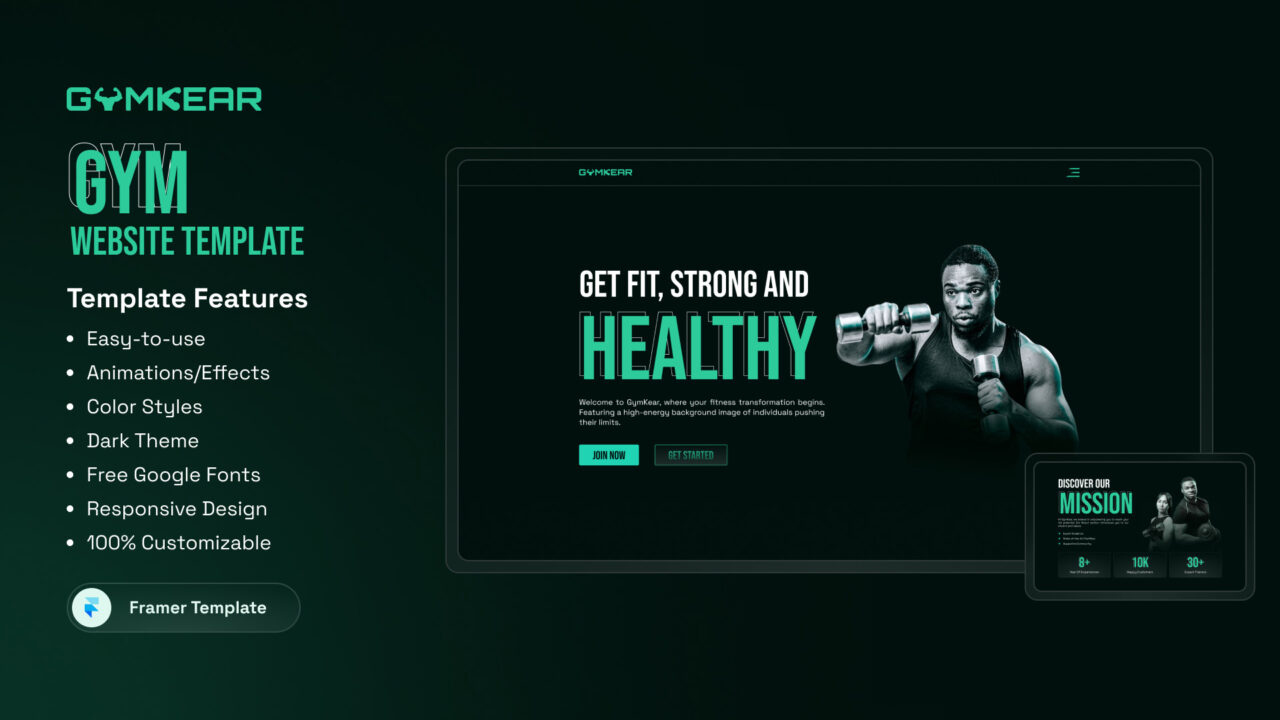
Gymkear Features:
- Easy-to-use
- Animation/effects
- Color Styles
- Dark Theme
- Free Google Fonts
- Responsive Design
- 100% Customizable
For the best experience, open the demo in a new tab.
Frequently Asked Questions
Framer is a web-based design and development platform that allows users to create interactive and responsive websites without requiring advanced coding skills.
Yes, Framer is beginner-friendly and offers intuitive drag-and-drop tools, pre-made templates, and comprehensive tutorials to help new users.
Framer provides responsive design tools, animation capabilities, no-code customization, CMS integration, and seamless team collaboration.
Yes, Framer allows you to design and publish fully functional and responsive websites directly from the platform.
Framer has built-in SEO tools, allowing users to optimize meta tags, titles, and descriptions to improve search engine visibility.
Yes, Framer supports integrations with various tools, such as Google Analytics, Mailchimp, Zapier, and others, to enhance functionality.
Framer focuses on interactivity and animation, offering designers and developers more creative freedom than traditional no-code platforms.