Published
- 2026-11-09
- 2026-11-09
- Framer
- Well Documented
- Fully Responsive
Additional Information
Published
2026-11-09
Last updated
2026-11-09
Technologies
Framer
Categories
We do not store any credit card information on our servers, payments are processed by world-leading payment gateways. We are fully secured with our SSL.

Verdora – Agriculture & Organic Farming Framer Template
Verdora — The Framer Template Organic Farming Brands Actually Need
Subheadline: Verdora gives organic farms, growers, and agricultural producers a ready-to-launch multi-page Framer site that showcases your land, seasonal harvests, and growing philosophy, and turns visitors into field walk and harvest visit bookings.
Who This Is For
1. The Organic Farm Owner You run a small or mid-sized organic operation and need a website that explains your growing practices, shows what’s in season, and helps customers find your produce without spending weeks on design.
2. The Agritourism or Direct-to-Consumer Grower You sell heirloom vegetables through a CSA, farm stand, or local market, and you host farm visits. You need a site that handles seasonal product browsing and books guided field walks and harvest experiences.
3. Freelance Web Designers and Agencies You build websites for agricultural clients, food producers, and sustainability-focused brands. Verdora gives you a polished, production-ready Framer foundation you can customize for each client, cutting project timelines and letting you deliver more with less production effort.
What’s Included
Pages
- The Farm — Introduces the land, the people, and the connected ecosystem behind every harvest.
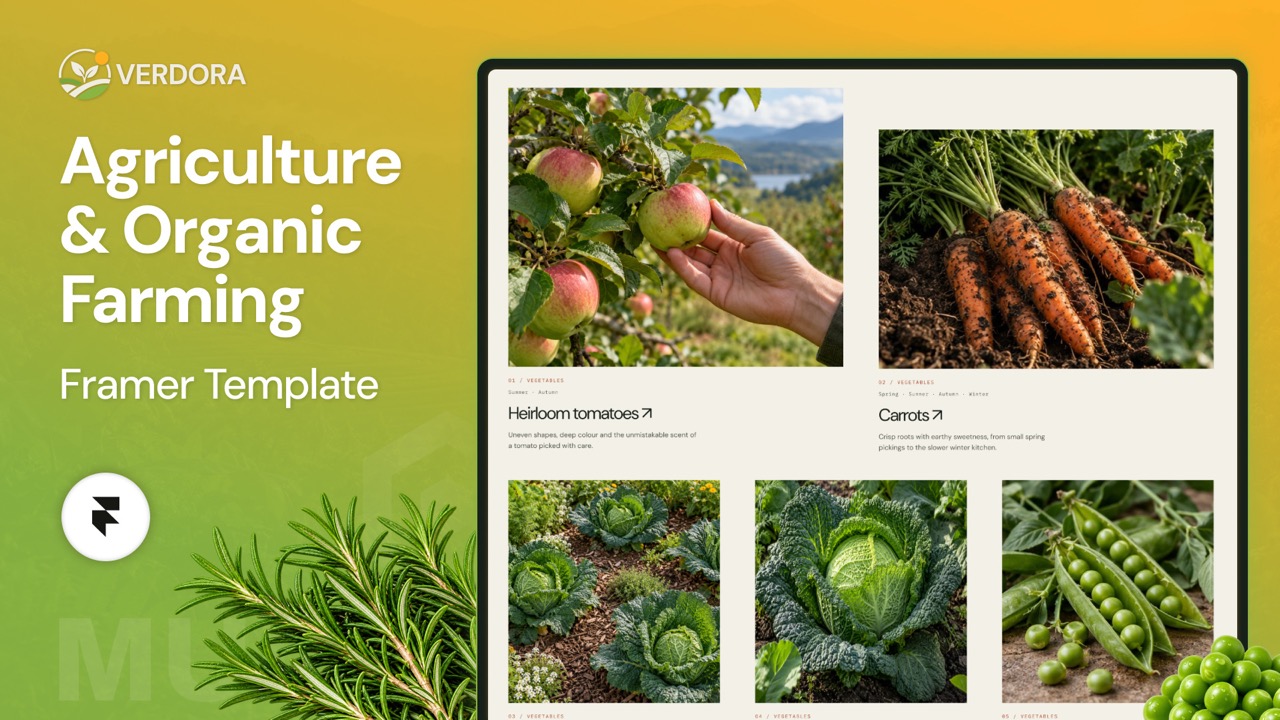
- Produce — Seasonal harvest grid with filtering and individual heirloom vegetable product pages.
- Our Approach — Explains sustainable growing methods like living soil, crop diversity, and water conservation.
- Field Notes — Blog hub for stories, seasonal updates, and lessons from the farm.
- Visit — Guided field walk and seasonal harvest visit options with booking.
- Contact — Simple inquiry form and location details for wholesale, CSA, or general questions.
- FAQ — Answers to common questions about ordering, pickup, visits, and growing practices.
Sections
- Hero — Full-width opening statement with bold farm imagery and a clear primary call to action.
- The Farm (A Connected World) — Visual storytelling about how soil, plants, animals, and people work together.
- From Field to Table (Produce Harvest Grid) — Filterable grid of what’s ready to harvest, sorted by season.
- A Way of Growing — Highlights of sustainable practices with clear, scannable value blocks.
- People of the Field — Team profiles that build trust and humanize the farm.
- There’s More to See (Visit Options) — Cards for field walks and seasonal harvest visits with booking links.
- Field Notes (Blog Previews) — Latest stories from the farm pulled from the blog collection.
- Footer — Navigation, contact details, social links, and newsletter signup.
Key Features
Seasonal Produce Filtering
Visitors can filter the harvest grid by Winter, Autumn, Summer, or Spring, so they always see what’s currently growing. This keeps the produce page fresh throughout the year and reduces questions about availability. Each seasonal view is driven by CMS data, so updating your harvest calendar takes minutes.
Sustainable Growing Practices Showcase
Dedicated sections present living soil, crop diversity, and water conservation in clear, visual blocks. This helps conscious buyers understand your methods at a glance. You can edit each practice as your operation evolves without touching the layout.
Guided Field Walk and Harvest Visit Booking
Visit page layouts present field walks and seasonal harvest experiences as bookable options. Each card includes details like what’s included, season, and group size, with a direct link to your booking tool. This turns curious visitors into paying guests.
Field Notes Blog
A built-in blog section shares stories from the farm, including weather updates, recipes, crop profiles, and behind-the-scenes posts. Posts are managed through Framer’s CMS, and blog previews appear on the homepage and the Field Notes page. Regular content also supports local SEO and builds loyalty.
Heirloom Vegetable Product Pages
Individual product templates let you showcase each heirloom variety with its story, growing notes, flavor profile, and season. Each page is built from a single CMS template, so adding a new variety means filling in fields rather than designing a new page.
Differentiators
1. Built Specifically for Agriculture, Not Adapted from Generic Templates Most Framer templates are built for SaaS or portfolios and require heavy rework to fit a farm. Verdora’s pages, sections, and content structure reflect how agricultural businesses actually present produce, practices, and visits.
2. Seasonal Logic Built In Generic templates have no concept of harvest timing. Verdora’s seasonal filtering and CMS-driven produce grid keep your site relevant year-round without manual updates to every page.
3. Revenue-Focused Visit and Booking Layouts Generic sites treat “visit us” as an afterthought. Verdora includes dedicated visit and booking sections designed to convert interest into field walk and harvest visit reservations, opening a revenue stream beyond produce sales.
Comparison Table
| Feature | Verdora | Generic Framer Template | Hire a Developer |
|---|---|---|---|
| Price | $99 one-time | $0–$79 | $3,000–$10,000+ |
| Time to Launch | About 24 hours | Days to weeks of customization | 3–8 weeks |
| Agriculture-Specific Pages | Yes (Produce, Approach, Visit) | No, requires custom build | Yes, if specified and built |
| Seasonal Produce Filtering | Included | Not included | Custom build required |
| Field Walk Booking Layout | Included | Not included | Custom build required |
| CMS Blog and Product Pages | Included | Basic, requires setup | Custom build required |
| No-Code Editing | Yes | Yes | No, depends on developer |
| Ongoing Developer Cost | None | None | Ongoing retainer or hourly fees |
| Responsive Design | Included | Varies | Included, at extra cost |
Technical Specs
- Platform: Framer
- Template Structure: Multi-page (7 pages)
- Content Management: Framer CMS collections for produce items, heirloom varieties, and Field Notes blog posts
- Filtering: Seasonal filter logic for Winter, Autumn, Summer, and Spring
- Responsive Design: Desktop, tablet, and mobile breakpoints
- Editing: No-code editing in the Framer visual editor
- Hosting: Framer hosting with custom domain support
- SEO: Editable meta titles, descriptions, and clean URL structure on every page
- Forms: Contact and booking inputs compatible with Framer forms and third-party booking tools
- Updates: Instructions for updating seasonal content and adding new products
FAQ
1. Do I need to know how to code to use Verdora in Framer? No. Verdora is built entirely in Framer’s visual editor. You can edit text, swap images, update CMS entries, and adjust the seasonal filter content without writing any code.
2. How do I update the seasonal produce filter for each harvest? Each produce item in the Framer CMS is tagged with its season (Winter, Autumn, Summer, or Spring). Add or edit an item, assign its season, and it appears automatically in the matching filter on the Produce page.
3. Can I connect my own booking system for field walks and harvest visits? Yes. The Visit page includes booking buttons you can link to any third-party scheduling tool, such as Calendly, Acuity, or a custom booking page. Framer’s embed features also support most booking widgets.
4. Can I add a new heirloom vegetable without building a new page? Yes. Product pages are generated from a single CMS template. Create a new entry with the variety name, story, growing notes, and season, and Framer builds its page using the existing layout.
5. Is Verdora suitable for small farms with limited produce, or only larger operations? Verdora works for both. Small farms can use a few product entries and the Visit and Field Notes sections, while larger operations can scale the Produce grid and blog to match their catalog and publishing schedule.
Verdora Features:
- Easy-to-Use Interface
- Ecommerce Template
- Modern Animations/Effects
- Clean & Professional Design
- Fully Responsive Layout
- SEO Optimized Structure
- Free Google Fonts
- 100% Customizable
For the best experience, open the demo in a new tab.
Frequently Asked Questions
Framer is a web-based design and development platform that allows users to create interactive and responsive websites without requiring advanced coding skills.
Yes, Framer is beginner-friendly and offers intuitive drag-and-drop tools, pre-made templates, and comprehensive tutorials to help new users.
Framer provides responsive design tools, animation capabilities, no-code customization, CMS integration, and seamless team collaboration.
Yes, Framer allows you to design and publish fully functional and responsive websites directly from the platform.
Framer has built-in SEO tools, allowing users to optimize meta tags, titles, and descriptions to improve search engine visibility.
Yes, Framer supports integrations with various tools, such as Google Analytics, Mailchimp, Zapier, and others, to enhance functionality.
Framer focuses on interactivity and animation, offering designers and developers more creative freedom than traditional no-code platforms.